Setup via Guest Wi-Fi
The following process of adding new device should be considered as the optimal way, how to add new device / sensors into the MQTT2GO Smart Home ecosystem. This way, we can provide the highest security to the users, as the Wi-Fi utilized for adding new devices is active only for the short period of time during the first step. The ideal process to add a new device is based on the following steps.
Setup Steps
- MQTT Controller (Mobile/Web App) initiates the process of adding a new device by subscribing to /<home_id>/<gw_id>/add_device. Then it publishes an activation request containing activation code, device id, and device type. The activation code and device id codes can be found on a newly installed device as two unique numbers identifying the device (placed on a device label or inside a QR code).
- In response to the request, SH-GW enables the guest Wi-Fi with SSID of MQTT2GO_Config, the activation code serves as password.
- MQTT end device (ED) then connects to the guest Wi-Fi and further utilizes mDNS (multicast DNS) to resolve address MQTT2GO.local (_mqtt._tcp.local.) and port, which equals to the address and port, respectively, of the local MQTT broker.
- The MQTT ED then connects to the local MQTT broker under the initialization account (only a pre-loaded certificate is used for login). The MQTT ED contains a pre-loaded certificate fingerprint of trustworthy CA (Certification Authority), which is used to establish TLS (Transport Layer Security) communication with the MQTT broker. The chain of trust must be on both sides. Thus, the SH-GW (MQTT broker) has to contain a certificate issued by the same CA as it is contained in the MQTT ED. If these certificates do not match, the TLS communication cannot be established, and the device will be refused as a non-trustworthy.
- When the TLS communication is established, the MQTT ED subscribes to the <activation_code>/activation/in topic and publishes GET_CREDENTIALS request to the <activation_code>/activation/out topic.
- As a response, SH-GW (local MQTT broker) generates a new set of certificates that will be used for ongoing communication and publishes its CA certificate, login, and password to the MQTT ED’s <activation_code>/activation/in topic.
- The MQTT ED further subscribes to <activation_code>/wifi/in and publishes GET_WIFI_CREDENTIALS request to <activation_code>/wifi/out.
- In response, the local MQTT broker issues Wi-Fi credentials (SSID, Password) for the home network. The Wi-Fi password is securely stored in SH-GW, providing the credentials to the local MQTT broker.
- When the MQTT ED receives the credentials, connection under the initialization account to the local broker is closed. The ED then connects to the home Wi-Fi with the acquired credentials.
- Further MQTT ED connects to the local MQTT broker with a certificate and credentials obtained in the step 6 and subscribes to <dev_id>/home/in. The certificate from the step 6 is directly connected to the device id. Thus only the device with proper device id value can utilize this certificate. This approach brings additional security to the device configuration process.
- In the next step, the MQTT ED publishes request of the home_prefix type to <dev_id>/home/in topic that contains all entities the ED provides with additional information on its data type and unit.
- The SH-GW publishes home_id and gw_id to <dev_id>/home/in. The MQTT2GO ED uses these prefixes to generate unique topics for each of its entities. As the local MQTT broker possesses information about all ED entities, it can generate topics on the local broker side.
- As a result, MQTT broker publishes the message to <home_id>/<gw_id>/add_device/in topic with device id information to distinguish individual devices. This message indicates to the controller that new ED was added to the system, and it is necessary to set a human-readable name and assign ED to the group(s).
- The local MQTT broker then expects a message from MQTT Controller with the end device name, group, and device_id.
- In what follows, the MQTT end device subscribes to its topic, and all ongoing communication happens according to the MQTT2GO standard.
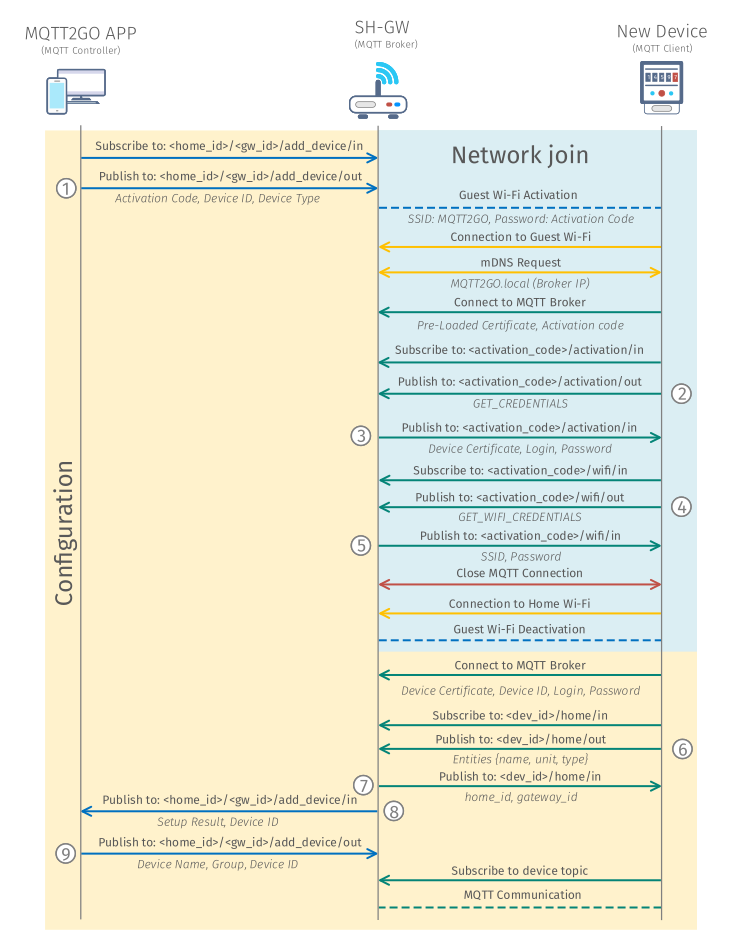
Fig. 1: Process of adding a new MQTT2GO device via guest Wi-Fi.
Network Join
The operation of adding a new device into the network / household is exploiting a special topics. These topics are only temporary and utilized only for this specific use-case.
Topics Structure
As aforementioned, network join topics are unique inside the MTT2GO standard and are solely used for the initial connection of new devices. Their structure is given in following subsections.
MQTT Commands
The MQTT commands for the network join are again based on the general structure from MQTT Commands. The most important difference is the value of the command, which can be further divided by the function of the command message (the numbering here corresponds to the one in Fig. 1).
Get Credentials
This command (2) is utilized to get a newly generated certificate for the end device. Its command value is in form of string with value GET_CREDENTIALS.
<activation_code>/activation/out
{
    "timestamp": "timestamp_value",
    "type": "mqtt_credentials",
    "value": "GET_CREDENTIALS"
}
Get Wifi Credentials
In case of Get Wi-Fi credentials (4), which is used to obtain the Wi-Fi credentials, again the command value is GET_WIFI_CREDENTIALS string.
<activation_code>/wifi/in
{
    "timestamp": "timestamp_value",
    "type": "wifi_credentials",
    "value": "GET_WIFI_CREDENTIALS"
}
MQTT Reports
These reports are specifically designed only for the network join. They follow the general structure from MQTT Reports, and they are labeled with numbers that correspond to the Fig. 1.
Credentials Report
This report (3) is utilized to deliver a newly generated certificate, password, and login from MQTT broker to the end device.
<activation_code>/activation/in
{
    "timestamp": "timestamp_value",
    "type": "mqtt_credentials",
    "value":  {
        "cert": "device_certificate",
        "user": "mqtt_login",
        "password": "mqtt_password"
    }
}
Wi-Fi Credentials report
This report (5) is used to send the Wi-Fi credentials back to the end device. As the TLS connection is active initially, the credentials are transmitted in the secure (encrypted) way.
<activation_code>/wifi/in
{
    "timestamp": "timestamp_value",
    "type": "wifi_credentials",
    "value": {
        "SSID": "wifi_ssid",
        "password": "password"
    }
}
Device Configuration
The device configuration is happening over topics that are unique to this only process. To secure that the configuration will be done to the intended device, a unique device_ids is utilized during the process.
Topics Structure
The topics for the device configuration presented in this section are for the initial device configuration only.
MQTT Commands
The MQTT Commands mentioned below are used in adding a new device process. The command structure is based on the structure from MQTT Commands. Again, the numbering in this section is coherent with the numbering in Fig. 1.
Add New Device
This command (1) is utilized to start the whole process of adding a new device. The command contains the activation_code, device_id, and device_type of the newly added device.
<home_id>/<gw_id>/add_device/out
{
	"timestamp": "timestamp_value",
	"value": {
		"activation_code": "activation_code",
		"device_id": "device_id",
		"device_type": "device_type"
	}
}
Get Home Prefix
In case of Get Home Prefix (6), which is used to obtain the home prefix, that consists of home_id and gateway_id. The command value consists of array of the available topic names of the current device, together with unit name and type.
<device_id>/home/out
{
    "timestamp": "timestamp_value",
    "type": "home_prefix",
    "value": [
      {"name": "topic_name",
       "unit": "unit_quantity",
       "type": "unit_datatype"
      }, ...
    ]
}
Rename Device
This command (9) is utilized to finalize the process of adding a new device to the system. Via this report, the end device gains its name and inclusion to the groups.
<home_id>/<gw_id>/add_device/out
{
	"timestamp": "timestamp_value",
	"value": {
		"device_id": "device_id",
		"device_name": "device_name",
		"group_id": ["group_id_1", "group_id_2", ...]
	}
}
MQTT Reports
The MQTT reports presented here are designed as “responses” to aforementioned commands. Their structure is also coherent with the general structure from MQTT Reports and the numbering is matching the one in Fig. 1.
Home Prefix Report
The home prefix report (7) consists of home_id and gateway_id.
<device_id>/home/in
{
    "timestamp": "timestamp_value",
    "type": "home_prefix",
    "value": {
      "home_id": "home_id_value",
       "gateway_id": "gateway_id_value"
    }
}
Rename Device Report
This report (8) is utilized to request the user of the MQTT2GO Controller app for the name and group of the newly added device.
<home_id>/<gw_id>/add_device/in
{
	"timestamp": "timestamp_value",
	"value": {
		"device_id": "device_id",
		"setup_result": "setup_result"
	}
}